Data Archiving
Right-size your database with data archiving strategies that reduce costs,
improve performance, and keep historical data accessible and compliant.
0$
savings
0%
improvement
0%
in system size
0Months
& RISE migrations
Addressing Data Volume Changes for
Outcomes Your CIO Wants to See.
Reduced costs, improve system and team performance, and ensure compliance along the way.
Challenges
Data volume challenges faced by organizations.
Addressing Data Volume Changes for
Outcomes Your CIO Wants to See.
Reduced costs, improve system and team performance, and ensure compliance along the way.
Challenges
Data volume challenges faced by organizations.


The data archiving process
and it's importance
SAP data archiving moves inactive business data out of the live database while keeping it secure, compliant, and accessible when needed.
With ongoing archiving, SAP users can control database growth and maintain a lean, efficient SAP environment.
SAP Data Archiving Components & Strategies
From identifying the right archiving objects to selecting the right location, each component plays a critical role in optimizing system performance, controlling costs, and ensuring long-term data management success.
-
Data Archiving
Move inactive business and transactional data out of the live SAP system to a more inexpensive location while maintaining access.
-
SAP DaRT
DaRT helps simplify data retention for audit compliance, securely extracting, storing, and accessing critical data.
-
Storage Location Determination
Define the best storage for each data type based on cost, compliance, and accessibility needs.
-
Native Storage Extension
Tier (hot/warm/cold) less frequently accessed data outside of expensive in-memory storage.
-
HANA Memory Optimization
Optimize how data is stored and accessed in SAP HANA to improve performance & reduce usage.

Data ASSIST is the #1 Solution for Automating Data Archiving
Data ASSIST simplifies identifying and archiving redundant or non-essential data with a visual analysis of your database and ROI Projections. Reduce database size, lower storage costs, and improve overall SAP efficiency without the manual work with automated scheduling.
Explore Data ASSIST
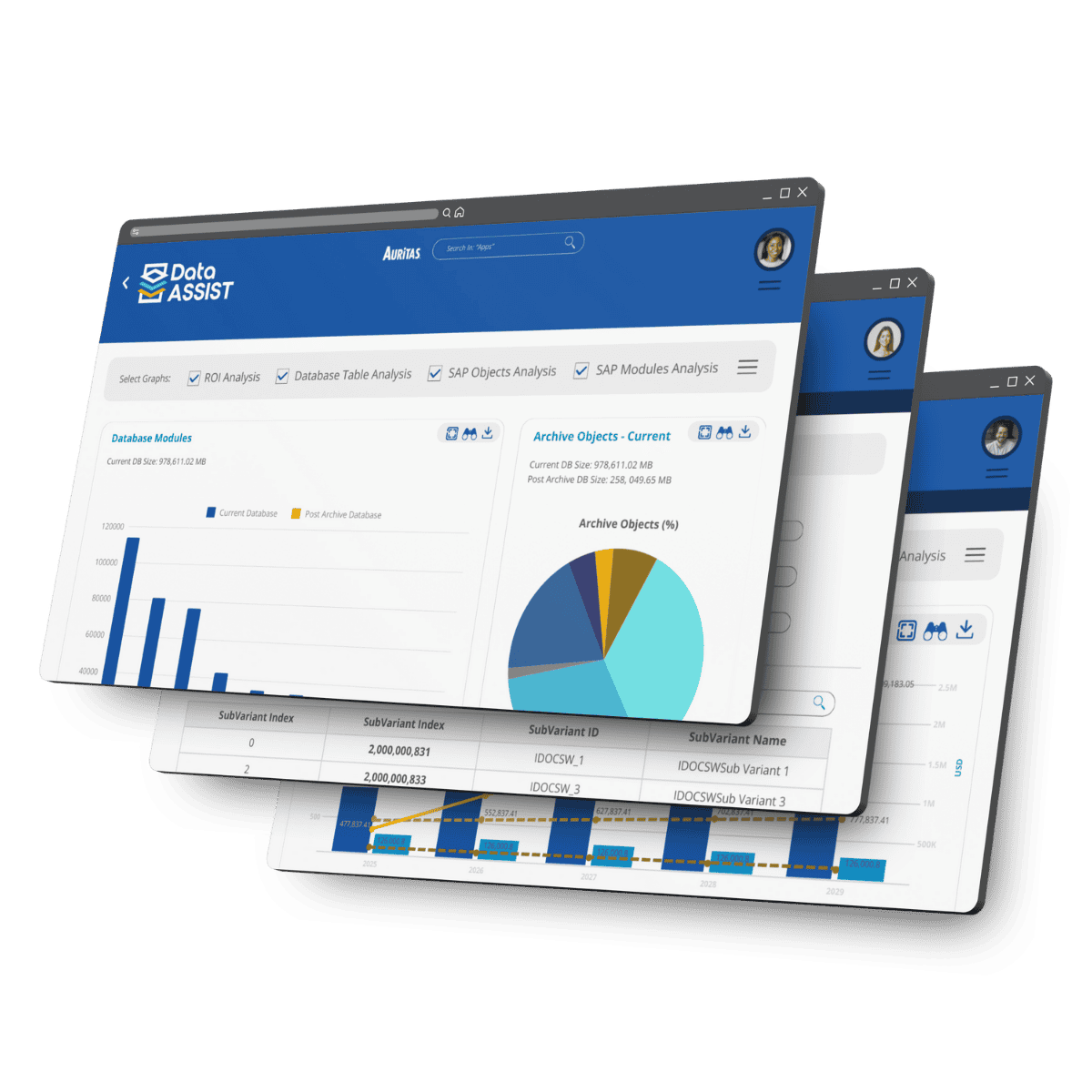
Data ASSIST is the #1 Solution for Automating Data Archiving
Data ASSIST simplifies identifying and archiving redundant or non-essential data with a visual analysis of your database and ROI Projections. Reduce database size, lower storage costs, and improve overall SAP efficiency without the manual work with automated scheduling.
Explore Data ASSISTProven Customer Results
See how SAP leaders turned data challenges into business advantages.

40% reduction in database size
Advanced data archiving helped with ongoing growth control and legal and regulatory compliance.

84% database size reduction
Data archiving shrunk database size from 5TB to 800GB getting project payback in 10 months.
$4.4M cumulative savings
Preparing for S/4HANA migration, with data archiving database growth reduced by 85%.

Nearly 100% data relocated
Data volume management and migration strategies for enhanced database performance capabilities.
What customers are saying about Auritas...
With over $2 billion in cumulative customer savings, Auritas' data
volume management solutions deliver measurable business outcomes.



How to get started?
Assess Your Data Volume
The Data Volume Assessment (DVA) is a complimentary evaluation that analyze your enterprises' database size, storage utilization, and volume management within your SAP environment, identifying size reduction opportunities and tailored recommendations.

Explore Resources

What to Look for in an SAP Data Archiving Tool
Learn the essential capabilities to evaluate when selecting an SAP data archiving solution for long-term success.

Data Archiving vs. Legacy Retirement
Understand when to archive historical SAP data and when retiring legacy systems delivers greater business value.

Navigating Data Archiving: Key Steps for Success
Explore the critical phases for planning, executing, and sustaining a successful SAP data archiving strategy.

The Difference Between SAP Data Purging and Archiving
Learn how archiving and purging differ, and when each supports compliance, performance, and data lifecycle management.
Data Archiving FAQs
What is the sap archiving process?
The SAP archiving process moves business data from the production database into secure archive storage (a cheaper location) once the defined residence period ends. The data remains archived and accessible until it reaches it residency period. This helps reduce system size while keeping historical records available for audit, legal, and business needs.
How does SAP archiving improve system performance?
SAP data archiving reduces the amount of data stored in the active production system. With less data to process, SAP transactions, reports, backups, and maintenance tasks run faster and place less strain on IT resources.
Can users access archived data from directly from SAP?
Yes, users can access archived data directly from SAP when the archiving setup is configured properly. This allows teams to retrieve historical records for reporting, audits, customer service, or business reference without restoring data back into production. To ensure that happens, partner with experienced consultants for your data archiving project.
What are SAP archiving objects?
SAP archiving objects define which data can be archived, along with the related tables and programs used in the process. They help organize data by business area, such as finance, sales, marketing, or materials management.